Training · Controlling API Access with STOA
STOA PRODUCT TRAINING · API Access Control, APIs & AI Agents, Governance & Evidence
Controlling API Access with STOA
Follow Hélios through two free modules. Replay the JWT checks on a REST route and the decisions of an MCP tool policy using recorded lab responses.
- Audience
- CIO & Engineering Leadership, Project Managers & Product Owners, Architects & Security, API & Platform Engineers
- Level
- Fundamentals
- Duration
- 35–40 min · no setup
- Access
- 2 free modules · direct access
- Verified trace
Verified on local runs on 15 November 2026. View the verified details ↓
THE PROGRAMME
The programme, module by module
01First Protected API: Filter Access and Scope a PilotFree access
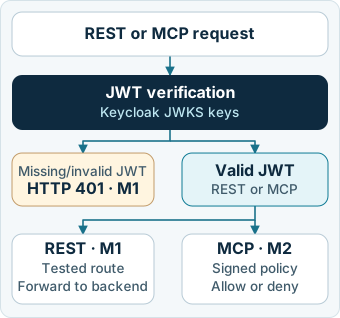
Objective. On the tested route, compare the two rejections for a missing or invalid token and the backend response for a valid token.
View the verified details
First Protected API: Contract, 401/401/200 Proof, and Quickstart Limits. Read the recorded responses on GET /apis/quickstart/ping-api/ping after declaring the contract on STOA Gateway. The route returns HTTP 401 without a token, HTTP 401 with an invalid token and HTTP 200 with a valid Keycloak JWT. In this setup, /health/ready returns HTTP 503.
- Declaring the Contract Directly on STOA Gateway6 min
- Proving Access Control: The 401 / 401 / 200 Sequence Without Inventing Anything6 min
- Local JWT Validation (JWKS), Scope of tenant_id, and the /health/ready (503) Limit5 min
02AI Agents: Which Tools Can They Run?Free access
Objective. Separate the tools an AI agent can see in the catalogue from those it is allowed to execute, and check how denials surface across channels.
View the verified details
MCP Tool Policies, Tool Execution, and the /health/ready Probe. Observe how a signed policy affects the /health/ready probe and execution of two MCP tools on the STOA Gateway and Keycloak bench.
- Pinned Control Plane Image (405), Ed25519 Signed Policy, and Switching /health/ready from 503 to 2006 min
- Two-Endpoint Contract, POST /mcp/tools/list Discovery, and Presence of the Denied Tool7 min
- Tool Execution: HTTP 403 on /mcp/tools/call Versus JSON-RPC -32001 Under HTTP 2006 min
Architecture and access
STOA at a glance
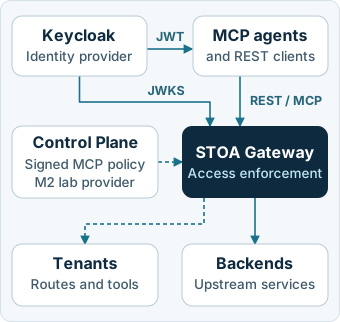
JWT and MCP policy
BY THE END
Make API exposure decisions backed by reproducible evidence
- Read the access-control evidence on a pilot REST route.
- Distinguish visible tools from tools an agent can execute.
View the verified details
- Connect the declared JWT contract (POST /admin/contracts) to the three 401 / 401 / 200 responses recorded on the REST route. Distinguish those responses from the /health/ready response (503).
- Validate an Ed25519-signed MCP tool policy via a pinned JWKS (/health/ready shifting from 503 to 200 READY with the lab CP provider), separate tool visibility in POST /mcp/tools/list from authorized execution, and read both HTTP 403 (/mcp/tools/call) and JSON-RPC -32001 under HTTP 200 (/mcp) denials.
WHO IT IS FOR
This course is for you if
- CIOs and engineering leaders evaluating from real evidence what an API and AI agent gateway proves — and what still needs validation.
- Project managers and Product Owners framing clear acceptance criteria before opening a service to an external partner.
- Security and platform architects reviewing access control and readiness probes.
- Platform engineers who want in-browser evidence replay first, with reproducible local benches available on demand.
It is not for you if
- Teams looking for a generic introduction to APIs or containers unrelated to STOA.
- Organisations seeking to qualify their production environment.
View the verified details
This course is for you if
- CIOs and engineering leaders who want factual clarity on what an API gateway demo proves — and what it does not yet test.
- Project managers and Product Owners defining acceptance criteria for a first protected REST route.
- Security and platform architects reviewing local JWKS-cached JWT verification, OIDC claims, and operational probes.
- API and platform engineers who want offline trace replay first and an isolated Docker reproduction via tools/run-lab.sh on 127.0.0.1.
It is not for you if
- Teams looking for a generic introduction to REST or Docker unrelated to STOA.
- Teams looking to qualify their production Control Plane or enterprise identity provider.
BOTH MODULES ARE FREE
Start right in your browser
Take both modules in your browser, starting with “First Protected API: Filter Access and Scope a Pilot”. Replay the traces on the Decision-maker or Expert path, then use the guides if you want to reproduce the Docker trials.
Start module 1COURSE DESIGN
STOA Learn Curriculum Team
Gateway Engineering & API Governance
This course aligns decision-makers and engineering teams around the exact same evidence: interactive browser modules with zero setup and zero external calls during replay, backed by reproducible local benches for your engineers.
View the verified details
Both modules use source commit 639e8b9a2217695cfc2f590e246ed9d4ce4d4913 and recorded lab responses. Module 1 follows the STOA quickstart. Module 2 pairs STOA Gateway and Keycloak with an identified lab Control Plane provider.
FREQUENT QUESTIONS
Before you start
What do I need to complete both modules?
The free course takes 35 to 40 minutes in your browser. Trace replay makes no external calls. Optional reproduction requires Docker and initial network access to pull images and Rust crates.
Why does Module 2 use a lab Control Plane provider?
At commit 639e8b9a2217695cfc2f590e246ed9d4ce4d4913, the gateway expects an Ed25519-signed JWS artifact. GET /v1/tenants/quickstart/tool-permissions/artifact returned HTTP 405 in the run with the pinned control-plane-api:1.14.1 image. In the second setup, policy_fixture.py signs and serves the artifact and responds to /health and minimal STOA Gateway discovery requests.
Why is the Docker build duration described as a variable estimate?
Base images are pulled by SHA-256 digest while stoa-gateway is compiled in Rust (cargo build --release --locked) into a personal image tag scoped to the lab project. Cold builds typically take roughly 5 to 15 minutes depending on hardware and bandwidth, versus about a minute with a warm Docker cache.
Where do the HTTP responses and commands come from?
In Module 1, verify.sh runs curl. In Module 2, Python urllib records the HTTP status and body. The Module 2 curl -w commands are equivalents for reproducing the requests. The lessons label filtered excerpts.
What data is stored while I go through the modules?
Only your selected role, path (Decision-maker or Expert), and completed steps per module, inside your browser’s localStorage (key stoa-learn). Zero cookies and zero external calls during replay are used, and the “Erase my progress” button clears everything immediately.
TRIAL SCOPE
What the traces cover
The two modules use local lab runs. Account for the limits below before applying the results to your environment.
- The full production Control Plane, enterprise human multi-factor authentication (MFA), and high-availability deployment are not qualified by these local runs.
- In the minimal Module 1 setup, the readiness probe stays pending while no tool policy is loaded.
- Module 2 uses a lab signing service after the Control Plane image pinned for the lab rejected the signed artifact request.
View the verified details
- Pinned control-plane-api:1.14.1 image: GET /v1/tenants/quickstart/tool-permissions/artifact returned HTTP 405 Method Not Allowed. Module 2 replaces the Compose control-plane service with policy_fixture.py to test policy bootstrap.
- Module 1 readiness probe: GET /health/ready returns HTTP 503 (NOT READY: tool policy unavailable) until an Ed25519-signed tool policy is loaded under STOA_POLICY_TRUST_JWKS_FILE.
- MCP discovery vs execution (Module 2): POST /mcp/tools/list (HTTP 200, 17 tools) still lists denied tool uac:quickstart:ping-api:ping-api-1; execution is denied with HTTP 403 on POST /mcp/tools/call and JSON-RPC error -32001 (data.httpStatus: 403) under HTTP 200 on POST /mcp.
- The backend for both runs is lab nginx 1.27.5-alpine with no business data.
PROVENANCE & EVIDENCE
What was verified on the real bench
Verified on local runs on 15 November 2026.
View the verified details
- Local runs on 15 November 2026 used stoa-platform/stoa commit 639e8b9a2217695cfc2f590e246ed9d4ce4d4913. The lab used source-declared platform version 2.3.0, stoa-gateway 0.9.25, control-plane-api 1.14.1, Keycloak 26.5.3, PostgreSQL 16.10-alpine and nginx 1.27.5-alpine. Module 2 uses policy_fixture.py as its lab Control Plane provider.
- In Module 1, POST /admin/contracts returns HTTP 201 (routes_generated: 1, tools_generated: 1). The REST route GET /apis/quickstart/ping-api/ping returns HTTP 401 without a token, HTTP 401 with Bearer invalid and HTTP 200 with a valid Keycloak JWT verified locally via JWKS. GET /health/ready stays at HTTP 503 in this setup.
- In the initial Module 2 setup, GET /v1/tenants/quickstart/tool-permissions/artifact returns HTTP 405 Method Not Allowed on the control-plane-api:1.14.1 image pinned to digest sha256:a8c01bfac64865f543f7836d6b3f1e626896817913c47715b240760bd3f58c81.
- Module 2 (real STOA Gateway and Keycloak + entire control-plane service replaced in Compose by an explicit lab CP provider serving JWS signing, /health, and three minimal discovery responses): altered JWS signature rejected with HTTP 503 on /health/ready, valid JWS turning /health/ready to HTTP 200 READY, POST /mcp/tools/list (401 without token, 200 listing 17 tools including the denied tool), allowed execution in 200 against http://backend:80, and denial returning HTTP 403 on POST /mcp/tools/call or JSON-RPC error -32001 (data.httpStatus: 403) under HTTP 200 on POST /mcp.
- The runs use a lab nginx backend with no business data. The production Control Plane and its synchronisation require tests in the target environment.
ARCHITECTURE & TEAMS
Test on your APIs,
with your teams.
The Expert path provides the steps to reproduce the REST and MCP trials on a local Docker bench. Find more configuration options in the STOA documentation.
Explore STOA documentation